Microsoft Copilot Studio Course in Dubai, UAE
Build Practical AI Agents With Microsoft Copilot Studio
Learn to design, build, connect, test and publish AI agents through 24+ hours of guided Microsoft Copilot Studio training. Work with knowledge sources, topics, tools, Power Automate and practical business use cases in Dubai or live online across the UAE.

Microsoft Copilot Studio Course Overview
Learn to build useful Microsoft AI agents for employee, customer and business-process needs.
The course combines clear demonstrations, guided builds, practical business labs and feedback. Start with the user need, give the agent suitable knowledge and instructions, connect the right actions, then test the result before planning publication.
- 24+ hours of live guided agent-building practice.
- Dubai classroom and live online across the UAE.
- Recordings, LMS resources, templates and checklists.
- Private, one-to-one and corporate delivery.
- Beginner-friendly and no-code first.
Duration, Delivery, Fees and Next Batch
- Duration: 24+ guided hours.
- Modes: classroom, live online, one-to-one and corporate.
- Location: Mankhool, near BurJuman Metro.
- Schedule: weekday, weekend and private options.
- Fees: current AED fee available on enquiry.
- Certificates: KHDA and Delphi AI Academy course-completion certificates.
What Is Microsoft Copilot Studio?
Microsoft Copilot Studio is used to create and manage AI agents that can answer questions, guide conversations and take suitable actions.
A well-designed agent needs more than a prompt. It needs a defined purpose, trustworthy knowledge, clear conversation paths, suitable access, testing and an owner responsible for keeping it useful. The course teaches this full practical process.
Knowledge agents
Help users find grounded answers from approved business information.
Action-enabled agents
Connect tasks, workflows and approvals through suitable tools and Power Automate.
Managed agents
Test, publish, review and improve agents with clear ownership and controls.
Build, Test and Publish AI Agents
Leave with a clear agent-building method and practical evidence of what you can create.
Choose the right use case
Define the audience, business need, agent scope, source information and success measure.
Design better answers
Use instructions, knowledge sources, suggested prompts and conversation paths carefully.
Connect useful actions
Use tools and Power Automate flows with controlled handoffs and approvals.
Test before publishing
Check accuracy, source grounding, edge cases, permissions and failure paths.
Plan deployment
Prepare agents for suitable sharing, feedback, monitoring and improvement.
Apply governance checks
Consider approved data, access, privacy, human review and accountable ownership.
Microsoft Copilot Studio vs Copilot, AI Automation and AI Agents
| Learning route | Main focus | Best for |
|---|---|---|
| Copilot Studio Course | Build, connect, test and publish Microsoft AI agents. | People creating agent solutions in the Microsoft ecosystem. |
| Microsoft 365 Copilot Course | Use Copilot Chat, Word, Excel, PowerPoint, Outlook and Teams. | Professionals improving daily productivity. |
| AI Automation Course | Cross-platform workflows using n8n, Make, Zapier and AI steps. | Teams automating recurring business work. |
| AI Agents Course | Vendor-neutral agent principles and broader orchestration. | Learners exploring AI agent design beyond Microsoft tools. |
| Corporate AI Training | Custom programmes across tools, functions and organisation needs. | Companies building shared AI capability. |
Microsoft Tools Used in the Course
Learn the role each Microsoft tool plays in a practical AI agent workflow.
 Copilot StudioAgent building
 Power AutomateActions and workflows
 Microsoft TeamsCollaboration channels
 SharePointKnowledge sources
 DataverseBusiness data awareness
 Power PlatformConnected solutions
Platform features can change. The course focuses on transferable agent-design, testing and governance methods alongside the current Microsoft tools.
10 Practical Microsoft Copilot Studio Modules
Move from agent planning through knowledge, conversations, actions, testing, publishing and a final business capstone.
01. Copilot Studio Foundations
Understand what Microsoft Copilot Studio does, how agents differ from Microsoft 365 Copilot and when an agent is the right solution.
02. Plan and Create an AI Agent
Define the user, business outcome, scope, instructions, suggested prompts and boundaries before building.
03. Knowledge Sources and Grounded Answers
Use approved files, websites and business knowledge appropriately. Improve answer quality and recognise when a source does not support an answer.
04. Topics, Conversation Design and Variables
Build guided conversation paths using topics, questions, conditions, variables, entities and suitable fallback routes.
05. Tools, Actions and Power Automate
Connect an agent to useful actions and Power Automate flows. Design approval, handoff and exception paths for real work.
06. Business Data, Connectors and Dataverse
Understand connectors, permissions, data mapping and Dataverse awareness at the level needed for practical agent design.
07. Orchestration and Agent Behaviour
Compare deterministic topics, generative orchestration and controlled autonomous behaviour. Choose the right level of freedom for the task.
08. Test, Debug and Improve Responses
Create test questions, check grounded answers, identify failures, adjust instructions and document changes.
09. Publish, Share and Monitor
Prepare an agent for suitable channels, sharing, user feedback, analytics and ongoing improvement.
10. Governance and Dubai Business Capstone
Apply access, privacy, review and ownership checks. Build and present a practical business agent with a clear use case.

Complete Practical Copilot Studio Outputs
Build evidence of a structured agent-design process, not only a course-completion certificate.
- Agent use-case and scope brief.
- Agent instructions and suggested prompts.
- Knowledge-source design.
- Conversation map and topic flow.
- Power Automate action workflow.
- Test questions and improvement record.
- Deployment and monitoring plan.
- Working business-agent capstone.
Build Agents for Common Business Needs
Work through practical cases that link the agent to a clear user, source, task and review process.
HR knowledge agent
Help employees find policy information with approved sources and escalation paths.
Finance process agent
Guide recurring finance questions, requests and controlled follow-up actions.
Customer-service agent
Support consistent answers, request capture and handoff to a person.
IT service agent
Route common support needs using knowledge, questions and suitable actions.
Operations agent
Guide checklists, approvals, updates and exception escalation.
Learning support agent
Help learners find course information, resources and next steps.
Connect AI Agents to Useful Actions
An agent can do more than answer a question when it connects to a controlled action, workflow or human approval.
Learners practise selecting appropriate actions, mapping inputs and outputs, using Power Automate flows, handling exceptions and deciding when a human needs to review the work.
KHDA and Delphi AI Academy Course Certificates
Successful participants receive a Delphi AI Academy/EduDelphi certificate and a KHDA certificate on successful completion.
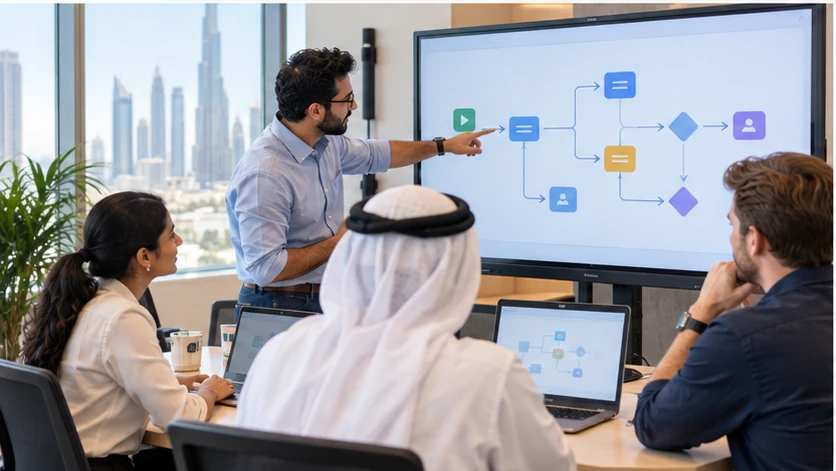
Professional AI training in Dubai
EduDelphi is delivered through Delphi Star Training Center, a KHDA-approved professional training institute in Dubai. Course completion is supported by practical assessment, guided outputs and trainer feedback.
The current Microsoft Applied Skills learning route for building an agent in Copilot Studio is a useful external progression reference. Its Microsoft assessment remains separate from this course.
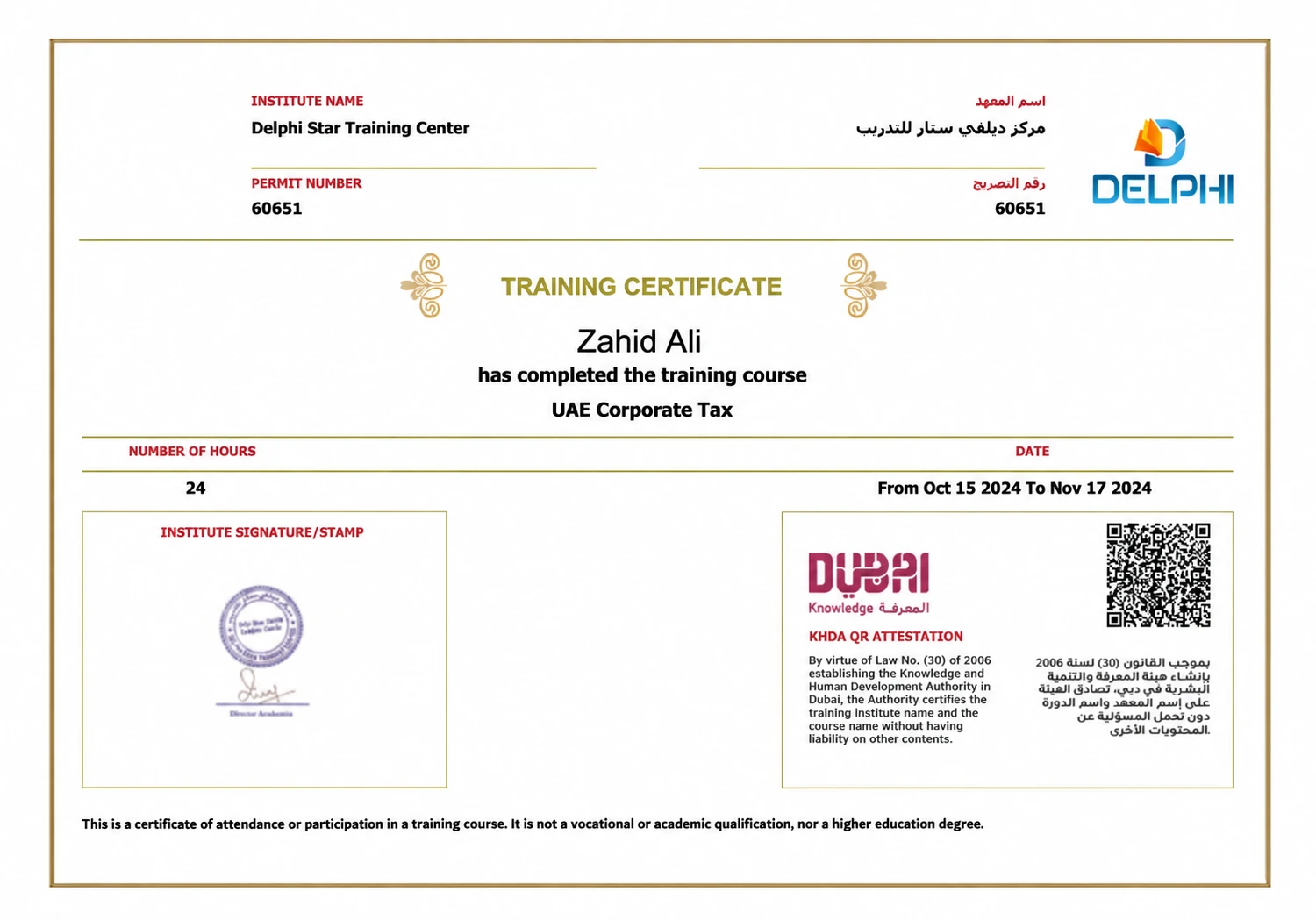
Sample KHDA-attested training certificate.
Copilot Studio Training in Dubai and Across the UAE
Dubai classroom
Attend live, trainer-led sessions in Mankhool near BurJuman Metro with guided agent builds and feedback.
Live online
Join in UAE time from Dubai, Abu Dhabi, Sharjah, Ajman or elsewhere with the same live structure.
Private one-to-one
Choose a focused schedule and pace when individual attention or role-specific agent work matters.
Corporate delivery
Train teams onsite across the UAE, in the Dubai classroom or live online.
Recordings and LMS
Revisit demonstrations, templates, agent examples, checklists and course resources.
Weekday and weekend
Ask for current weekday, evening, weekend and fast-track availability.
Flexible Instalments With Tabby and Tamara
Ask the course team about available instalment options when requesting the current Microsoft Copilot Studio Course fee and schedule.
Copilot Studio Training for Companies in Dubai and the UAE
Build a team programme around approved Microsoft tools, practical agent use cases, governance needs and measurable outputs.
- Onsite, Dubai classroom or live-online delivery.
- Role-based agent labs and business use cases.
- Approved knowledge, access and review requirements.
- Testing, governance and responsible-use controls.
- Team assessment, practical outputs and support.

Selected organisations that have received EduDelphi AI training.






Copilot Studio Course Near BurJuman Metro
Attend in Mankhool or join live online from anywhere in the UAE.
Delphi Star Training Center
Building R308, Office 401Mankhool, near BurJuman Metro Exit 3
Dubai, United Arab Emirates
+971 4 396 3634
The centre is approximately a three-minute walk from BurJuman Metro. Ask the team for current classroom access and parking guidance.
Beginner-Friendly Agent Builder Training
- Business analysts and Power Platform users.
- IT, digital-transformation and automation teams.
- Customer service, HR, finance and operations professionals.
- Knowledge-management and service-design teams.
- Consultants, solution owners and managers.
- Corporate teams building shared agent capability.
Microsoft 365 familiarity and business-process knowledge are helpful. Coding is not required for the core course.
Microsoft Copilot Studio Course FAQs
What is Microsoft Copilot Studio?
Microsoft Copilot Studio is Microsoft’s platform for building and managing AI agents. It can use approved knowledge, follow conversation paths, connect to actions and Power Automate flows, and be published for appropriate users or channels.
Is Microsoft Copilot Studio different from Microsoft 365 Copilot?
Yes. Microsoft 365 Copilot helps people work in applications such as Word, Excel, PowerPoint, Outlook and Teams. Copilot Studio focuses on building, connecting, testing and publishing AI agents. Learners focused on daily productivity can choose the Microsoft 365 Copilot Course.
Do I need coding experience for the Copilot Studio course?
No. The core course is designed for business professionals, analysts, app makers and teams. It is practical and no-code first, while explaining data, connectors and workflow concepts needed for reliable agent design.
Will I build an AI agent during the course?
Yes. Learners work through a practical agent from use-case planning and knowledge design through conversations, actions, testing, deployment planning and governance checks.
Does the course cover Power Automate?
Yes. Learners connect agent actions to practical Power Automate flows and learn when a controlled workflow, a human approval or a broader AI Automation route is more suitable.
Does this course include a Microsoft certification or assessment?
The course develops agent-building skills that align with current Microsoft Copilot Studio learning pathways. Microsoft assessments and credentials are separate from EduDelphi course completion.
What certificates will I receive?
Successful participants receive a Delphi AI Academy/EduDelphi course-completion certificate and a KHDA certificate through Delphi Star Training Center.
Can companies arrange Microsoft Copilot Studio training?
Yes. Corporate programmes can be delivered onsite across the UAE, in the Dubai classroom or live online. The programme can be shaped around approved tools, functions, governance needs and practical agent use cases.
Can I join live online from Abu Dhabi, Sharjah or another Emirate?
Yes. Learners can join live online across the UAE. Dubai classroom training is available in Mankhool near BurJuman Metro, alongside private one-to-one and corporate options.
What are the fees and next batch dates?
Fees and schedules are enquiry-led because classroom, live-online, private and corporate formats differ. Request the current AED fee, detailed syllabus and available batch options. Flexible instalments are available through Tabby and Tamara.
Get Microsoft Copilot Studio Course Fees, Syllabus and Next Batch
Tell us your preferred learning format and schedule. We will share the current AED fee, complete syllabus, available batches and private or corporate options.
- 24+ guided hours and a practical working-agent capstone.
- Dubai classroom and live online across the UAE.
- Recordings, LMS resources and flexible instalments.
Get Fees, Syllabus and Next Batch
24+ hours · Working AI agent · Classroom and live online